XCRESCO
Cluster Features
The XCRESCO cluster located in Frascati is a computing system composed of 60 compute nodes. Each node is equipped with:
2 sockets with 16 cores IBM POWER9 AC922 processors, with a clock frequency ranging from 3.1 GHz
256 GB of RAM
Nvlink 2.0
4 NVIDIA Volta V100 GPUs with 16 GB of RAM.
Mellanox IB EDR 100Gb/s
Disk Space 140TB usable NFS storage
Peak Performance about 1.9 Pflop/s, 32 TFlops per node
The architecture of a XCRESCO can be represented by the following scheme:
Note
The peak performance of XCRESCO (58 compute nodes + 2 login nodes) is about 1.9 PFlops. The performance of the single node is 32 TFlops due to 0.8 for the CPU part and 7.8x4 for the four GPUs on the node. The theoretical peak performance is 60*(0.8+4*7.8) = 1.92 PFlop/s.
In the table below you can find the single node theoretical peak performance of the AC992 CN node with two Power9 processors and four Nvidia V100 GPUs.
PARAMETER |
VALUE |
|---|---|
CPU (nominal/peak freq.) |
691/791 GFlops |
GPU |
31.2 TFlops |
Total |
32 TFlops |
Memory Bandwidth (nominal/peak freq.) |
220/300 GB/s |
Front-end Nodes
Access to the cluster is performed by logging in to one of the front-end nodes. Front-end nodes are intended for submitting jobs through SLURM, editing job submission scripts, and compiling applications.
Compute nodes can only be accessed through SLURM.
For the XCRESCO cluster, the following front-end nodes are available:
xcrescox001.frascati.enea.it
xcrescox002.frascati.enea.it  (also available for interactive jobs)
Access
To access the system via SSH, refer to the documentation at the page Access to CRESCO System.
Note that the access to the ENEAGRID front-end nodes can also be performed via the web interface available on the CRESCO Open OnDemand page:
File Systems
The file systems available on XCRESCO are:
AFS: The geographically distributed file system shared across the entire ENEAGRID infrastructure. Information about the common HOME directory structure for all ENEAGRID/CRESCO users can be found in the section File Systems and Data Management available here.
In addition to the home directory $HOME, for each user is defined a scratch area, a NFS storage area shared with all compute and login nodes.
Compilers and Numerical Libraries
The table below lists the compilers and numerical libraries available on XCRESCO.
NVIDIA HPC SDK
As of August 5, 2020, the “PGI Compilers and Tools” technology is a part of the NVIDIA HPC SDK product, available as a free download from NVIDIA.
Invocations |
Usage |
|---|---|
NVC |
Compile C source files (C11 compiler. It supports GPU programming with OpenACC
and supports multicore CPU programming with OpenACC and OpenMP)
|
NVC++ |
Compile C++ source files (C++17 compiler. It supports GPU programming with C++17 parallel algorithms
(pSTL) and OpenACC, and supports multicore CPU programming with OpenACC and OpenMP)
|
NVFORTRAN |
Compile FORTRAN source files (supports ISO Fortran 2003 and many features of ISO Fortran 2008.
It supports GPU programming with CUDA Fortran and OpenACC, and supports multicore
CPU programming with OpenACC and OpenMP)
|
NVCC |
CUDA C and CUDA C++ compiler driver for NVIDIA GPUs |
For legacy reasons, the nVIDIA HPC SDK suite also offers the PGI C, C++, and Fortran compilers with their original names:
Invocations |
Usage |
|---|---|
PGCC |
Compile C source files. |
PGC++ |
Compile C++ source files. |
PGF77 |
Compile FORTRAN 77 source files. |
PGF90 |
Compile FORTRAN 90 source files |
PGF95 |
Compile FORTRAN 95 source files |
The OpenMP parallelization is enabled by the -mp compiler option. The GPU offload via OpenMP is enabled by the -mp=gpu option.
GNU compilers
The gnu compilers are always available but they are not the best optimizing compilers, it ensures the maximum portability. You do not need to load the module for using them.
The name of the GNU compilers are:
Invocations |
Usage |
|---|---|
g77 |
Fortran77 compiler |
gfortran |
Fortran95 compiler |
gcc |
C compiler |
g++ |
C++ compiler |
MPI Flavours Available
The MPI flavours available on the system, grouped by compiler, are listed in the following table.
OpenMPI |
openmpi/4.1.6–gnu–11.3–cuda |
Cuda |
cuda/nvhpc-openmpi4/24.1
cuda/nvhpc/24.1
|
The OpenMPI module provides the following wrappers
COMPILER |
WRAPPER |
USAGE |
|---|---|---|
GCC |
mpicc |
Compile C source files with GNU |
G++ |
mpic++, mpiCC, mpicxx |
Compile C++ source files with GNU |
GFORTRAN |
mpif77, mpif90, mpifort |
Compile FORTRAN source files with GNU |
Nvidia GPUs
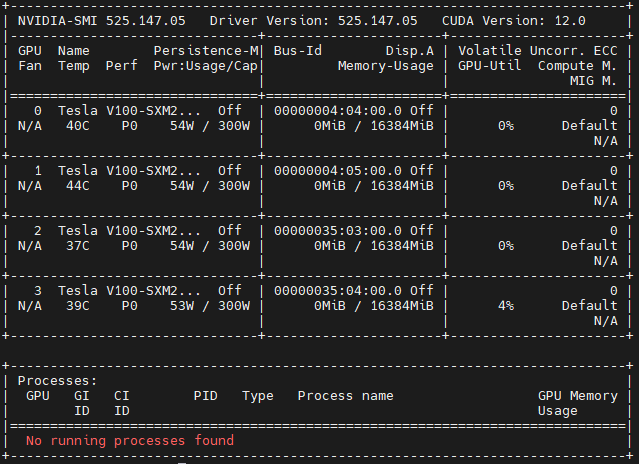
Each node of XCRESCO is equipped with 2 Power9 sockets, each of them with 16 cores and 2 Volta GPUs (32 cores and 4 GPUs per node). The multi-threading is active with 4 threads per physical core (128 total threads – or logical cpus – per node).
The command nvidia-smi provides monitoring and management capabilities for each Nvidia GPU
Note
Due to how the hardware is detected on a Power9 architecture, the numbering of (logical) cpus follows the order of threading. You can get it with the ppc64_cpu -info command and nvidia-smi topo -m to visualize the topology of the node.
Job Submission
The scheduler that manages the resources of XCRESCO and allows the submission of batch jobs is SLURM. Here you can find the full documentation.
SLURM Partitions on XCRESCO
PARTITION |
DESCRIPTION |
|---|---|
xcresco |
Main partition with 60 compute nodes equipped with IBM POWER9 CPUs. with Nvidia GPUs.
Both serial and parallel jobs can be submitted with a maximum running time of 24 hours.
Each job can requests maximum of 16 nodes with 4 GPUs for nodes*
|
Job Script Examples
Serial Job Example
In the following example the job uses one core on a single node.
#!/bin/sh
#SBATCH --nodes=1
#SBATCH --ntasks-per-node=1
#SBATCH --partition=xcresco
#SBATCH --job-name=serialJOB
#SBATCH --err=%j.err
#SBATCH --out=%j.out

/path/to/exe
GPU Job Example
In this example the job uses 4 GPU nodes.
#!/bin/sh
#SBATCH --nodes=1
#SBATCH --ntasks-per-node=1
#SBATCH --partition=xcresco
#SBATCH --job-name=serialJOB
#SBATCH --err=%j.err
#SBATCH --out=%j.out
#SBATCH --gres=gpu:4        # 4 gpus per node out of 4

/path/to/exe
Note
The maximum number of GPUs for each node is 4.
GPU use report
A statistics of the GPU utilization during a job, provided by nvidia dcgmi tool, can be obtained at the end of the job by explicitly requesting the constraing gpureport:
#!/bin/sh
#SBATCH --nodes=1
#SBATCH --ntasks-per-node=1
#SBATCH --partition=xcresco
#SBATCH --job-name=serialJOB
#SBATCH --err=%j.err
#SBATCH --out=%j.out
#SBATCH --gres=gpu:4              # 4 gpus per node out of 4
#SBATCH --constraint=gpureport    #or -C gpureport

/path/to/exe
Note
This option will result, at the end of the job, in producing a file for each of the nodes assigned to the job with the relevant information on the employed GPUs (performance statistics, such as Energy Consumed, Power Usage, Max GPU Memory Used, GPU and Memory Used etc.; Event Stats, as ECC Errors etc.; Slowdown Stats; Overall Health). The files are named “dcgmi_stats_<node_name>_<jobid>.out”.
Interactive Session Examples
Console session
srun --nodes=1 --ntasks-per-node=2 --cpus-per-task=64 -p xcresco --pty /bin/bash
Graphic session
srun --x11 --nodes=1 -t 10:00:00 --ntasks-per-node=2 --cpus-per-task=64 -p xcresco --pty /bin/bash
Note
A serial program can be executed in the standard UNIX way ./program.
This is allowed only for very short runs on the login nodes, since the interactive environment has a 10 minutes cpu-time limit. Please do not execute parallel applications on the login nodes.