CRESCO8
Cluster Features
The CRESCO8 cluster located in Portici is a computing system composed of 792 compute nodes, divided into three partitions:
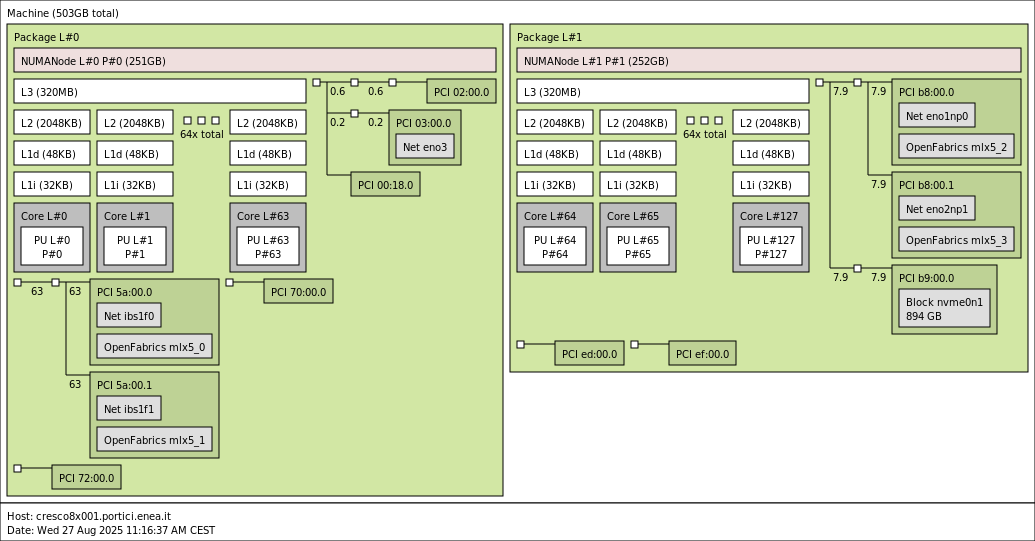
760 CPU nodes, each equipped with 2 sockets with 64 cores Intel(R) Xeon(R) Platinum 8592+ processors, with a clock frequency ranging from 1.9 GHz to 3.8 GHz, and 512 GB of RAM.
17 GPU nodes, each equipped with 2 sockets with 64 cores Intel(R) Xeon(R) Platinum 8592+ processors, with a clock frequency ranging from 1.9 GHz to 3.8 GHz, 512 GB of RAM, and 4 Intel(R) Data Center GPU Max 1550 (Ponte Vecchio) GPUs. Each GPU includes 128 Xe cores and 128 GB of HBM2e memory, divided into two compute units (tiles).
15 HBM nodes, each equipped with 2 sockets with 56 cores Intel(R) Xeon(R) CPU Max 9480 processors, with a clock frequency ranging from 1.9 GHz to 3.5 GHz, 1024 GB of RAM, and 128 GB of HBM memory.
In addition, each node provides:
a Mellanox NDR network interface with 200 Gb/s bandwidth
a 25 Gb/s GbE network interface
BMC/IPMI support and software for remote console management
Overall, the cluster provides a total of 101,136 CPU cores and 68 GPUs (136 GPU tiles) interconnected through a high-bandwidth, low-latency network based on 200 Gb/s Mellanox NDR technology.
The architecture of a CRESCO8 CPU node can be represented by the following scheme:
Front-end Nodes
Access to the cluster is performed by logging in to one of the front-end nodes. Front-end nodes are intended for submitting jobs through SLURM, editing job submission scripts, and compiling applications.
Compute nodes can only be accessed through SLURM.
For the CRESCO8 cluster, the following front-end nodes are available:
cresco8x001.portici.enea.it
cresco8x002.portici.enea.it   (also available for interactive jobs)
cresco8-gpu01.portici.enea.it (node equipped with Intel GPUs)
Access
To access the system via SSH, refer to the documentation at the page Access to CRESCO System.
Note that the access to the ENEAGRID front-end nodes can also be performed via the web interface available on the CRESCO Open OnDemand page:
File Systems
The file systems available on CRESCO8 are:
AFS: The geographically distributed file system shared across the entire ENEAGRID infrastructure. Information about the common HOME directory structure for all ENEAGRID/CRESCO users can be found in the section File Systems and Data Management available here.
LUSTRE: The high-performance parallel I/O file system. Information about Lustre for ENEAGRID/CRESCO users is available here.
Note
File transfer from CRESCO6 (GPFS) to CRESCO8 (LUSTRE)
Until September 30, 2025, a nightly one-way synchronization procedure from GPFS to LUSTRE is active according to the following rules:
Files created on CRESCO6 (GPFS) are synchronized daily (24:00) to CRESCO8 (LUSTRE).
Files created on CRESCO8 (LUSTRE) are not copied back to CRESCO6 (GPFS).
Files modified on CRESCO8 (LUSTRE) are not updated on CRESCO6 (GPFS).
Files modified on CRESCO6 (GPFS) are updated on CRESCO8 (LUSTRE).
Files deleted on CRESCO8 (LUSTRE) are not deleted on CRESCO6 (GPFS) and will be recreated on CRESCO8 (LUSTRE) during the next synchronization.
Files deleted on CRESCO6 (GPFS) are not deleted on CRESCO8 (LUSTRE).
Compilers and Numerical Libraries
The table below lists the compilers and numerical libraries available on CRESCO8.
GNU (11.4.1) |
Intel (OneAPI2023.2) |
Intel (OneAPI2025.1) |
|
|---|---|---|---|
PATH compilers |
/usr/bin |
/opt/intel/oneapi2023.2/compiler/2023.2.0/linux/bin/intel64 |
/opt/intel/oneapi2025.1/compiler/2025.1/bin/ |
PATH numerical libraries |
BLAS/LAPACK/ATLAS
/usr/lib64
/usr/lib/atlas-sse
/usr/lib64/atlas
/usr/lib64/atlas-sse
|
Intel MKL
/opt/intel/oneapi2023.2/mkl/2023.2.0/lib/intel64
icc and icpc are deprecated
|
Intel MKL
/opt/intel/oneapi2025.1/mkl/2025.1/lib
icc and icpc are no longer available
|
MPI Flavours Available
The MPI flavours available on the system, grouped by compiler, are listed in the following table.
GNU (version 11.4.1) |
Intel (version OneAPI2023.2) |
Intel (version OneAPI2025.1) |
|
|---|---|---|---|
OpenMPI |
openmpi_gcc-4.1.7 |
openmpi_intel-4.1.7 |
No flavour available |
Intel MPI |
No flavour available |
IntelMPI |
IntelMPI |
Intel GPUs
Each node of the accelerated partition of CRESCO8 is equipped with 4 Intel(R) Data Center GPU Max 1550 (Ponte Vecchio) GPUs. Each GPU provides 128 Xe cores and 128 GB of HBM2e memory, divided into two compute units (tiles), which can effectively be seen as 8 independent GPUs per node.
These GPUs support the execution of OpenCL and SYCL codes.
Note
CUDA and ROCm codes developed for NVIDIA and AMD GPUs are not supported.
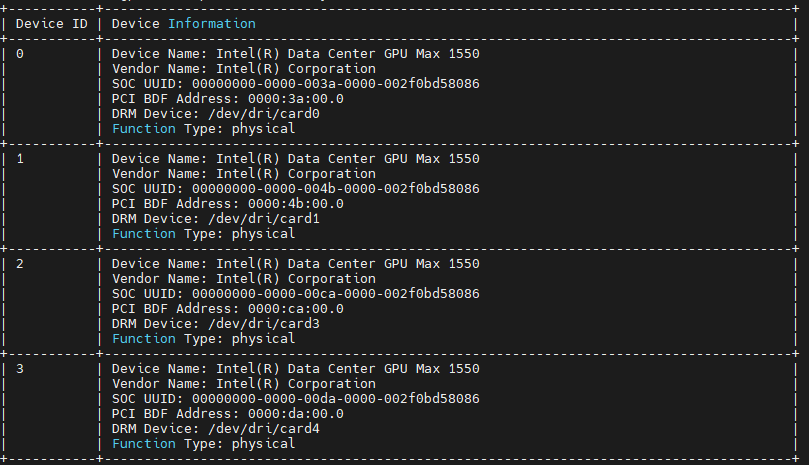
To display the list of GPUs on a node and monitor their usage and power consumption, the utility xpu-smi can be used.
A quick guide for this tool is available at the following link.
With the xpu-smi discovery command you can see the following information for each Intel GPU:
Note
Below are some useful links for programming and running applications on Intel GPUs:
Job Submission
The scheduler that manages the resources of CRESCO8 and allows the submission of batch jobs is SLURM. Here you can find the full documentation.
Below the are the SLURM partitions defined for CRESCO8 together with some examples of submission wrappers for serial and parallel jobs, valid for both OpenMPI and IntelMPI. Examples of submission scripts for hybrid jobs (MPI + OpenMP) are also provided.
SLURM Partitions on CRESCO8
PARTITION |
DESCRIPTION |
|---|---|
cresco8_cpu |
Main partition with 754 compute nodes equipped with Intel CPUs.
Both serial and parallel jobs can be submitted with a maximum running time of 24 hours.
|
cresco8_cpu_dbg |
Debug partition with 4 compute nodes equipped with Intel CPUs.
Both serial and parallel jobs can be submitted with a maximum running time of 1 hour.
|
cresco8_hbm |
Partition with 14 CPU-HBM compute nodes equipped with high-bandwidth memory.
Both serial and parallel jobs can be submitted with a maximum running time of 24 hours.
|
cresco8_hbm_dbg |
Debug partition with 2 CPU-HBM compute nodes equipped with high-bandwidth memory.
Both serial and parallel jobs can be submitted with a maximum running time of 1 hour.
|
cresco8_gpu |
Accelerated partition with 14 compute nodes equipped with Intel GPUs.
Both serial and parallel jobs can be submitted with a maximum running time of 24 hours.
|
cresco8_gpu_dbg |
Debug partition with 4 compute nodes equipped with Intel GPUs.
Both serial and parallel jobs can be submitted with a maximum running time of 1 hour.
|
Note
On the cresco8_cpu partition, several Quality of Service (QoS) configurations are defined, allowing users to utilize up to 250 compute nodes. Job priority is managed through a fairshare mechanism, which lowers the priority of jobs submitted by users who have already heavily used the system.
Job Script Examples
Serial Job Example
In the following example the job uses one core on a single node.
#!/bin/sh
#SBATCH --nodes=1
#SBATCH --ntasks-per-node=1
#SBATCH --partition=cresco8_cpu
#SBATCH --job-name=serialJOB
#SBATCH --err=%j.err
#SBATCH --out=%j.out

/path/to/exe
MPI Job Example
In this example the job uses 20 CRESCO8 nodes, launching 128 MPI processes per node.
#!/bin/bash
#SBATCH --nodes=20
#SBATCH --ntasks-per-node=128
#SBATCH --partition=cresco8_cpu
#SBATCH --job-name=jobMPI
#SBATCH --err=%j.err
#SBATCH --out=%j.out

mpirun /path/to/exe
Hybrid Job Example (MPI + OpenMP)
In this example the job uses 20 nodes, launching 2 MPI processes per node (one per socket). Each MPI process spawns 64 OpenMP threads.
#!/bin/bash
#SBATCH --nodes=20
#SBATCH --ntasks-per-node=2
#SBATCH --cpus-per-task=64
#SBATCH --ntasks-per-socket=1
#SBATCH --partition=cresco8_cpu
#SBATCH --job-name=jobMPI
#SBATCH --err=%j.err
#SBATCH --out=%j.out

export OMP_NUM_THREADS=${SLURM_CPUS_PER_TASK}
mpirun --bind-to none /path/to/exe
GPU Job Example
In this example the job uses 4 GPU nodes, launching 8 MPI processes per node (one for each GPU tile). Each MPI process spawns 16 OpenMP threads.
#!/bin/bash
#SBATCH --nodes=4
#SBATCH --ntasks-per-node=8
#SBATCH --cpus-per-task=16
#SBATCH --partition=cresco8_gpu
#SBATCH --job-name=jobMPI_GPU
#SBATCH --gres=gpu:8
#SBATCH --err=%j.err
#SBATCH --out=%j.out

export OMP_NUM_THREADS=${SLURM_CPUS_PER_TASK}
mpirun /path/to/exe
GPU Job Example with Explicit GPU Pinning
In this example each MPI process is explicitly bound to a GPU tile. Up to 8 MPI processes per node can be launched.
#!/bin/bash
#SBATCH --nodes=4
#SBATCH --ntasks-per-node=8
#SBATCH --cpus-per-task=16
#SBATCH --partition=cresco8_gpu
#SBATCH --job-name=jobMPI_GPU_pinning
#SBATCH --gres=gpu:8
#SBATCH --err=%j.err
#SBATCH --out=%j.out

export OMP_NUM_THREADS=${SLURM_CPUS_PER_TASK}
mpirun bash -c 'ZE_AFFINITY_MASK=$((PMI_RANK%SLURM_NTASKS_PER_NODE)) /path/to/exe'
Job Submission
All job types can be submitted using the following command:
sbatch submission_script
Note
To access the AFS filesystem during batch job execution, the token is generated on the compute nodes by SLURM daemons through integration with AUKS and the use of an AUKS helper script. AUKS generates the Kerberos ticket on the remote nodes by retrieving the user credentials from the login node cache. The helper script included with AUKS then invokes aklog to generate the corresponding AFS token from the Kerberos ticket. For additional information go to the following page.
Interactive Session Examples
Console session
srun --account=enea --nodes=1 --ntasks-per-node=2 -p cresco8_cpu --pty /bin/bash
Graphic session
srun --x11 --account=enea --nodes=1 --ntasks-per-node=2 -p cresco8_cpu octave